AI 加快了工作节奏,人也更难跟上。在 Anthropic,人们常用 简单的 Agent 自动化 来帮忙。它们往往 按计划跑,在后台攒上下文,主动告诉我们需要知道的事。但要做出有效的 Agent 自动化并不容易:可能在无人察觉时丢掉某个源的访问,或跟不上我们的偏好。
我们用 Claude Managed Agents(beta)做了一份参考实现:按计划读自定义源(如 Slack 与 GitHub 仓库),跟踪自上次运行以来的变化,并把你需要知道的内容发出去(如发到 Slack)。本文逐步走读,附参考实现,并给出一条可在 Claude Code 里跑的命令,帮你配好 Agent。
获取代码
参考实现在 这里。要交互式走读,在 Claude Code 里跑下面命令。claude-api Skill 可按本文指引帮你搭好 Agent:
/claude-api managed-agents-onboard https://claude.dev/blog/building-effective-agent-automations/这份参考实现需要一个 Slack app(从 manifest 创建)和一个 GitHub token。提供的文件(见下)是 Claude API 资源的配置:Agent、环境、memory store、vault 与 deployment。
daily-brief/
├── agent.md                        model, tools, instructions
├── deployment.md                   schedule, time zone, budget, input message
├── environment.yaml                network allowlist
├── memory_store_preferences.yaml   user preferences
├── memory_store_state.yaml         the agent's bookmarks, ledger, notes, and run records
├── vault.yaml                      the vault that holds the credentials
├── claude-lock.json                resource IDs, written by ant apply
└── slack/manifest.yaml             one bot app
ant apply(ant CLI 中的命令)读这些文件,在你的 Claude API workspace 创建资源(平台在此存储并运行),并把 ID 记入 claude-lock.json。
下文各节会用到该命令。配好后,自动化在 Anthropic 基础设施上按计划跑,因此 你的机器上不必一直挂着什么。
概览
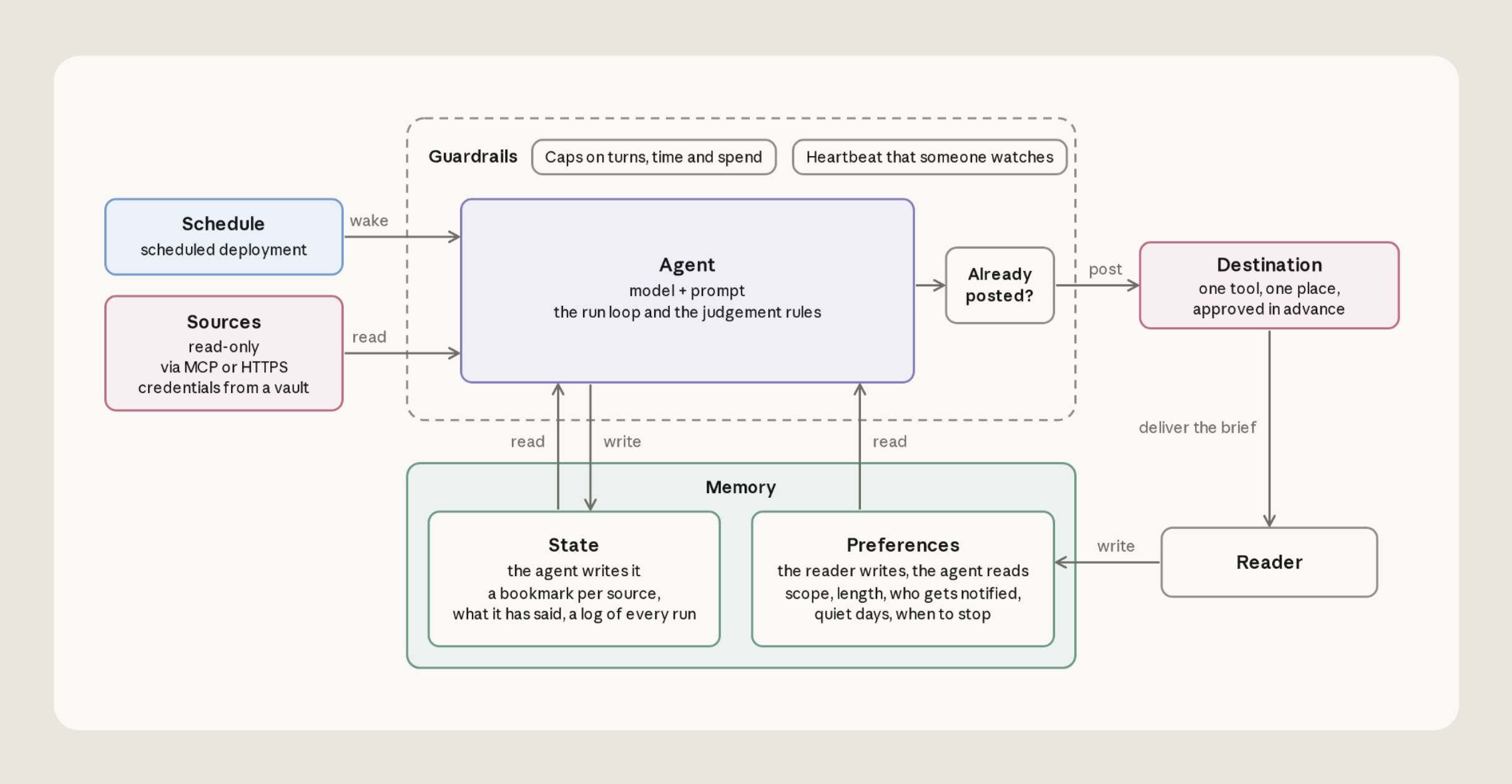
我们要建的 Agent 有六个组件,按此顺序讲:
- Sources — 具名的可读位置列表
- Destination — Agent 唯一可写之处
- Agent — agent.md 里的模型、工具与运行步骤
- Schedule — cron 计划
- Memory — 你的偏好与 Agent 自身记忆
- Guardrails — Agent 只读之处用只读访问,以及每次运行的花费上限
Sources
Agent 默认读两个源:Slack 频道与 GitHub pull request。频道与仓库列在你的 preferences 文件里。模板可扩展到其他源。
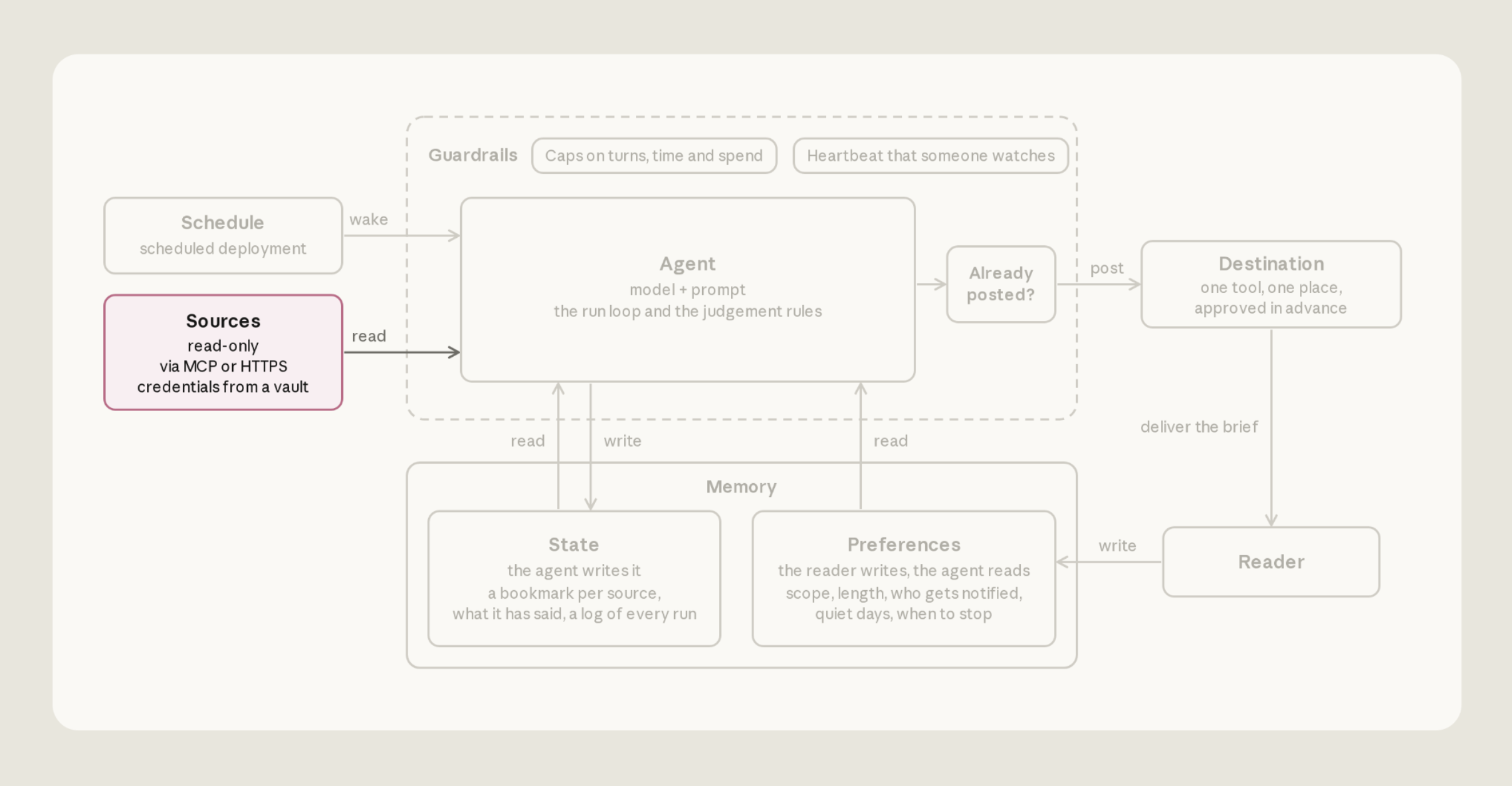
给 Agent 独立、有范围的凭证
在 Managed Agents 里,凭证放在 vaults。Agent 可引用这些凭证,真实值留在 vault 里,在 sandbox 外(Claude 的代码在 sandbox 里跑;另见 这里 与 这里):
-
MCP 服务器(GitHub)。 Agent 经 sandbox 外的代理调用 MCP 工具。代理按 URL 匹配找到对应 vault 凭证。
-
Shell(Slack)。 Agent 在 sandbox 里用 bash 工具经 curl 调 Slack API。Sandbox 里只有不透明占位符
$SLACK_BOT_TOKEN。请求离开 sandbox 时,平台对你允许的 host 换入真实 token。
用 ant CLI 与仓库里的模板文件创建 vault:
ant apply vault.yaml这会在你的 Claude API workspace 创建 vault(平台在此存储),并把 ID 记入 claude-lock.json。再用 TypeScript SDK 把各凭证加进 vault。下面是加 Slack 凭证的例子:
const vaultId = process.env.VAULT_ID!; // the vault's ID, from claude-lock.json

await client.beta.vaults.credentials.create(vaultId, {
  display_name: "SLACK_BOT_TOKEN",
  auth: {
    type: "environment_variable",
    secret_name: "SLACK_BOT_TOKEN",
    secret_value: process.env.SLACK_BOT_TOKEN!,
    networking: { type: "limited", allowed_hosts: ["slack.com"] },
    injection_location: { header: true },
  },
});
创建 vault 并加好各凭证后,把 vault 挂到 deployment。从 claude-lock.json 复制 vault ID 到 deployment 文件 deployment.md 的 vault_ids。
从上次停下的地方读
常见错误是让 Agent 读固定窗口,如「过去 24 小时」。跑晚了会留空档,跑早了会重复。应给每个源一个 bookmark。每次运行结束,Agent 把各源读到的最新条目时间戳写进一个文件 bookmarks.json,每源一条:"slack": "2026-09-14T13:02:11Z"。
下次从这些 bookmark 起读,窗口可拉长或缩短,覆盖自上次以来的全部内容。Bookmark 放在叫 state 的 memory store 里:一文件夹文本文件,平台挂到每次运行 sandbox 的 /mnt/memory/,并跨运行保留。Agent 用普通文件工具读写;agent.md 里的说明告诉它怎么用。
别把读失败当成安静的一天
若 MCP 服务器挂了或 token 过期,运行仍会启动,只是没有该服务器的工具。会话会记一条错误,但 Agent 从该源什么也看不到,于是报告「没什么新的」。
agent.md 里三条规则帮助修这个问题。源失败时,Agent 会:保持该源 bookmark 不动;用其他源写 brief;在 brief 末尾加一行点名读不到的内容(「本轮 pull request 不可用」),让读者知情。
Destination
我们的模板发到一个 Slack 频道,每次运行发一篇带日期的帖。
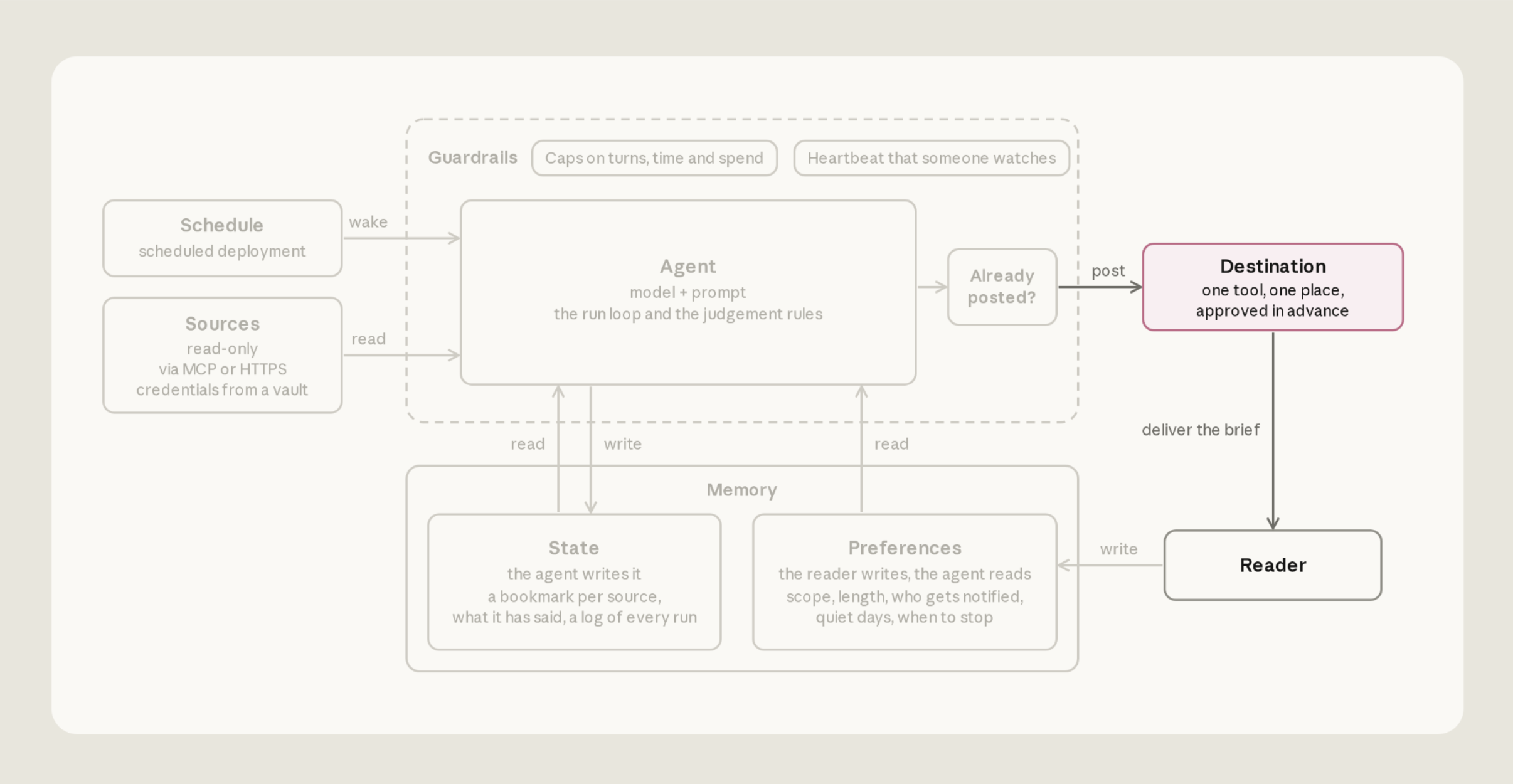
Agent 用 sandbox 里的 bash 工具发到 Slack,用的是与读取相同的 bot token。
发帖无需审批。Agent 用 bash 命令发送,内置 bash 工具默认不请求批准。slack.com 也在 Agent environment(其运行 sandbox)的 allowlist 上。发帖就是一次请求:
curl -s https://slack.com/api/chat.postMessage \
  -H "Authorization: Bearer $SLACK_BOT_TOKEN" \
  -H "Content-Type: application/json; charset=utf-8" \
  -d '{"channel": "C0123456789", "text": "Daily brief, Tue Sep 15 ..."}'
确认帖子落地后再记账
帖子确认后,Agent 更新已报告条目的 ledger 与 bookmark。若这些记录与实际发出的不一致,可能出两种问题:记了从未落地的帖,bookmark 前进,那些条目永远不会再报;或因不确定第一帖是否落地而再发一次,读者收到重复 brief。
agent.md 里三条规则防止这一点。第一,Agent 在频道近期消息里找今天的标题,若该版已在则不发。第二,仅当 Slack 返回 "ok": true 且有 message ts 时,才算发出。第三,仅在该确认之后更新 ledger 与 bookmark。若结果不清,标运行「maybe posted」,其余不改,以免丢失。
Agent 在 memory store 里保留运行记录(runs/<date>.md)。发帖前标「posting」,然后标「posted」并带 message ID,或「maybe posted」。
Agent
在 Claude Managed Agents 里,Agent 是版本化配置:模型、系统提示词和工具。每次运行按运行步骤执行并停止。
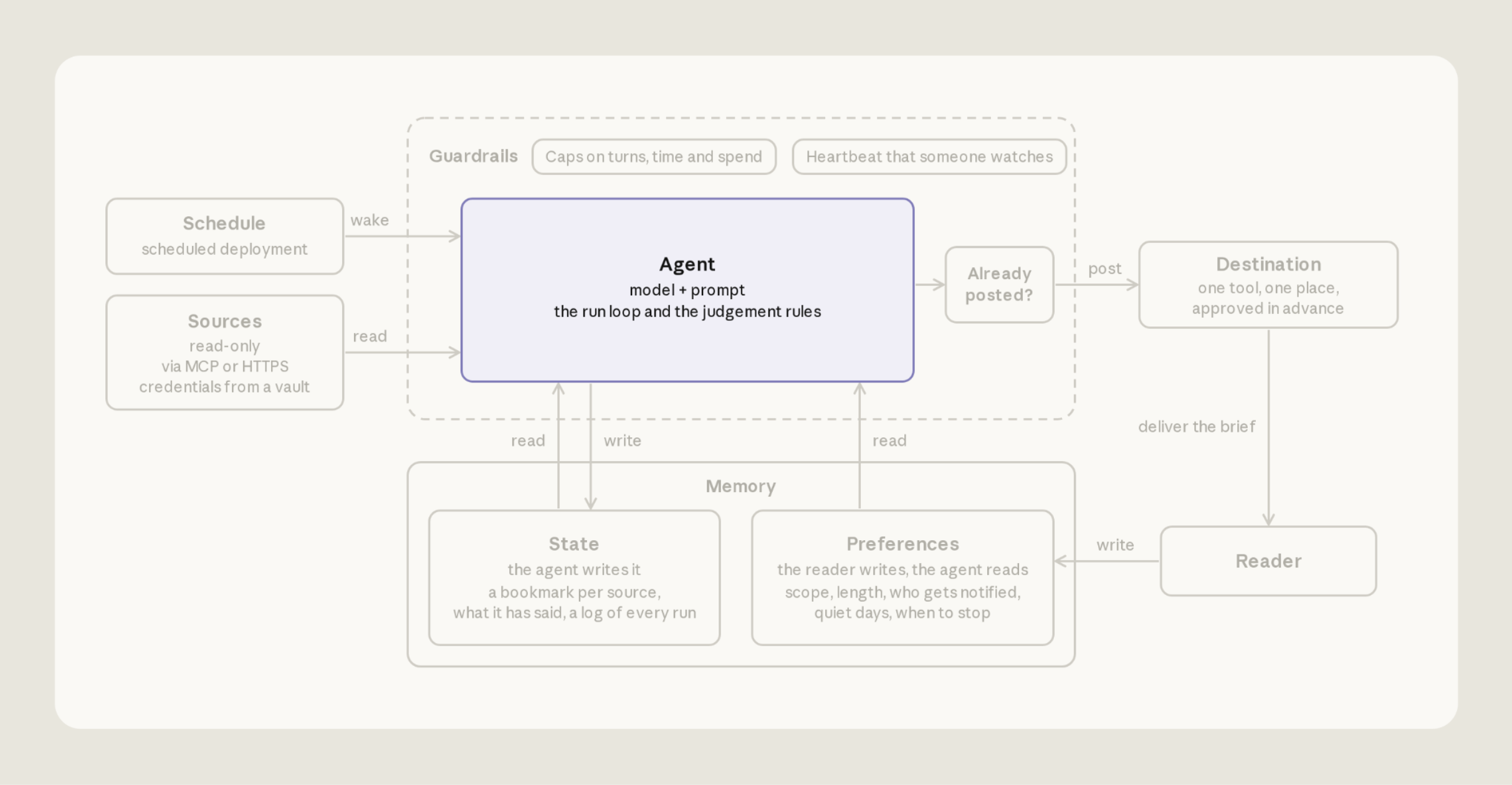
参考实现里,Agent 配置是 agent.md:
---
name: Daily brief
model: claude-sonnet-5-5
mcp_servers:
  - type: url
    name: github
    url: https://api.githubcopilot.com/mcp/
tools:
  - type: agent_toolset_20260401
    configs:
      - name: web_search
        enabled: false
      - name: web_fetch
        enabled: false
  - type: mcp_toolset
    mcp_server_name: github
    default_config:
      permission_policy:
        type: always_allow
---

[Eight numbered run steps; the full text is in agent.md in the repo.]
Frontmatter 提供 Agent 名、模型、工具与 MCP 服务器。正文是 Agent 指令。MCP 工具默认要批准,而无人在场,因此 GitHub toolset 设为 always_allow,GitHub token 为 read-only。
让 brief 保持短
agent.md 引导 Claude 简短:
4. Decide. An item earns a line when the reader would act on it today, or it changes a decision they are about to make. When unsure, leave it out. Most days that is a few items, sometimes none. A count ("12 open reviews") is not an item; link the ones that are blocked. An item already in the ledger and still open is carried as one marked line ("still waiting, day 3"), not re-reported; a closed item is dropped without comment. Do not bring back a topic the preferences file has retired.发帖前再核一遍仍开放的条目
Agent 读源到发帖之间,条目可能变化。发帖前,agent.md 指示 Agent 再核每个条目的实时状态:
5. Verify. The world moved while you read. For every item you will report, re-check its live source just before posting: resolved since you read it, drop it; still open but changed, fix the line; cannot confirm, drop it and list it in the run record's cuts. One stale "still waiting on you" costs more trust than ten missing items, so never hedge an item's status: assert it or drop it. Every link is copied from the source's own link field (a pull request's html_url, a Slack permalink), never assembled by hand.Schedule
在 Claude Managed Agents 里,Agent 只是配置文件;deployment 负责跑它。Deployment 点名 Agent、environment,以及每次运行的第一条消息。也持有计划、vault、memory store 与预算。计划触发时,平台启动一次新的 Agent session。
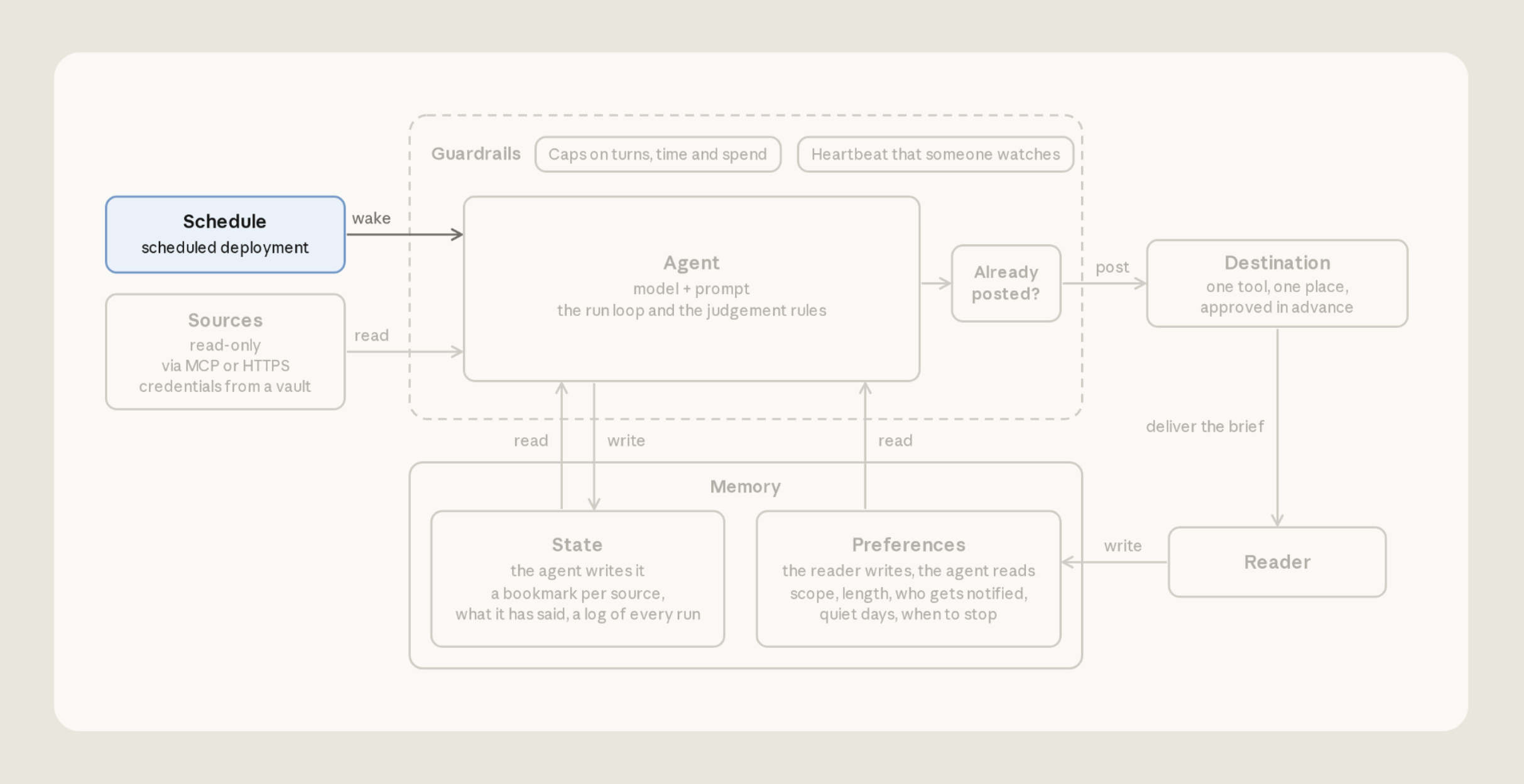
模板里 deployment 写在 deployment.md,第一条消息是正文:
---
name: Daily brief
agent: ./agent.md
environment_id: ./environment.yaml
schedule:
  type: cron
  expression: "32 7 * * 1-5"
  timezone: America/New_York
vault_ids: [vlt_...]   # the vault you create under Sources
resources:
  - path: ./memory_store_preferences.yaml
    access: read_only
    instructions: The reader's preferences. Re-read them every run. Never write here.
  - path: ./memory_store_state.yaml
    access: read_write
    instructions: Your state. Bookmarks, ledger, notes, proposals, and run records.

---

Write today's brief.
The reader's time zone is America/New_York. Work out every date in that zone.

Follow your run steps in order. Today's edition is titled "Daily brief, <weekday> <month> <day>".
这会创建 deployment,并按路径挂上它点名的 Agent、environment 与 memory store。
ant apply deployment.md不想等计划时,可用 ant beta:deployments run --deployment-id <id> 手动开跑,ID 来自 claude-lock.json。
按你的时区算日期
常见 bug 是 Agent 把今早叫成「昨天」——因为它按服务器时区算日期。在 deployment.md 里,timezone 字段决定何时触发,正文第二行告诉 Agent 用哪个时区算日期。
Memory
每次运行在全新 sandbox 里开始,没有上次的记忆。没有记忆,反馈留不住。但陈旧记忆也会迷惑 Agent:已解决的条目仍报「还在等」,或因「已经报过」丢掉仍开放的条目。
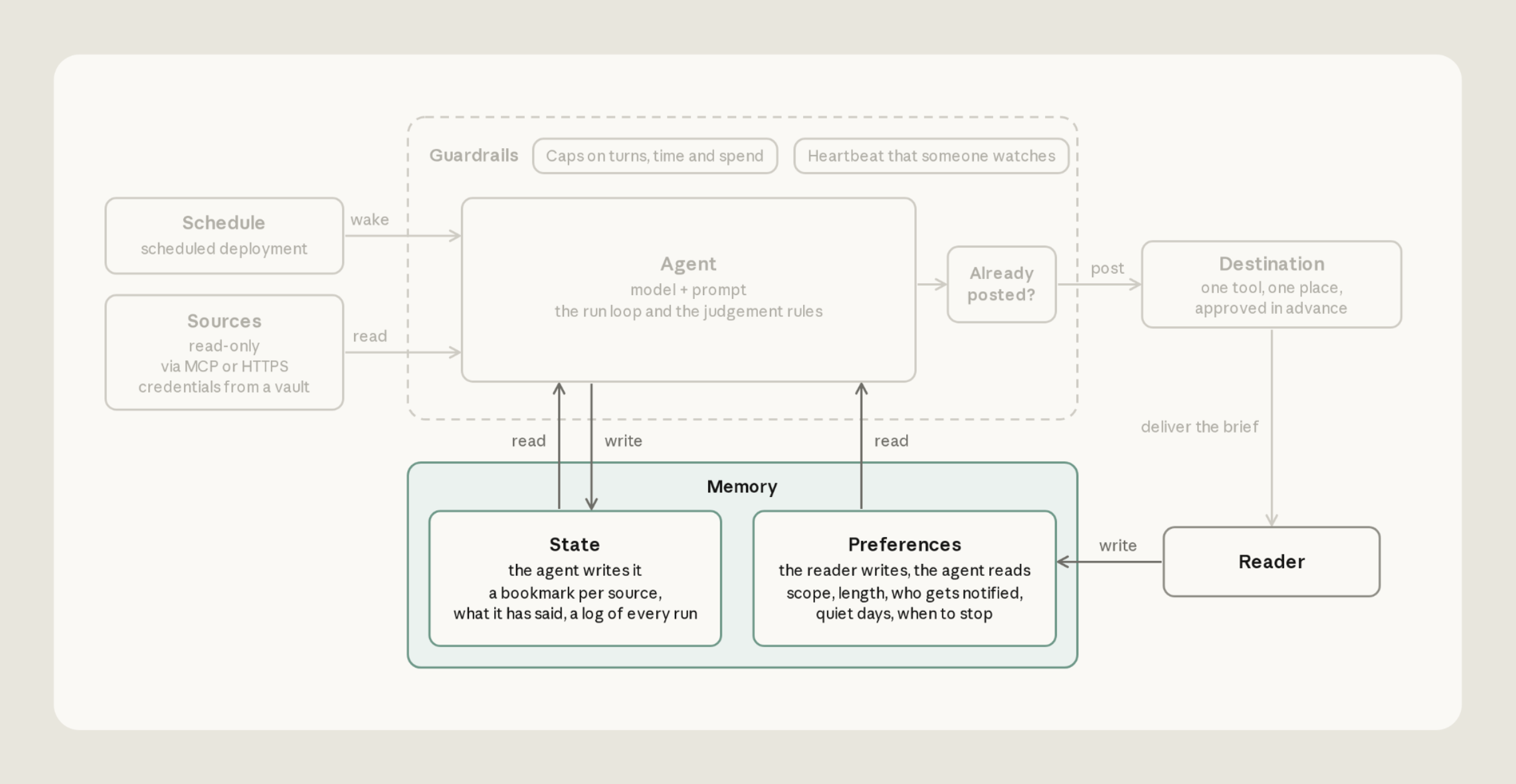
模板保留两个 memory store,挂在 /mnt/memory/ 下(见 Sources):
-
preferences(你的,Agent 只读):读哪些频道与仓库、排除什么、长度上限、目的地、何时停止。
-
state(Agent 的,可读写):bookmark、已报告 ledger、每次运行一条记录、对偏好的改动提议,以及对各源行为的笔记(「只返回最新 50 条」)。
ant apply deployment.md 会创建 preferences store,但不会写里面的文件。第一次运行前,用仓库的 scripts/seed-preferences.sh 写入 preferences.md。
每次运行开头重读偏好
常见问题是把偏好副本烤进提示词,于是一直用你已经改过的规则。应让 Agent 每次运行重新读文件。若读不到文件,应停下说明,而不是按默认跑。
保留已报告 ledger,并报告变化
Agent 维护 ledger.md,记下已报告的每条,避免 brief 重复。每行记录报告时间、来源、不变 ID(Slack 消息时间戳或 pull request 号),以及上次已知状态:
2026-09-09 slack:C0123456789 1788963600.000100 refund thread: customer waiting on a decision
2026-09-11 github 481 review blocked, day 2 (still waiting)
2026-09-11 slack:C0234567891 1789117333.000300 enterprise escalation: owner named, in progress
Guardrails
自动化在「后台」按计划跑,因此限制 Agent 能做什么、能花多少。
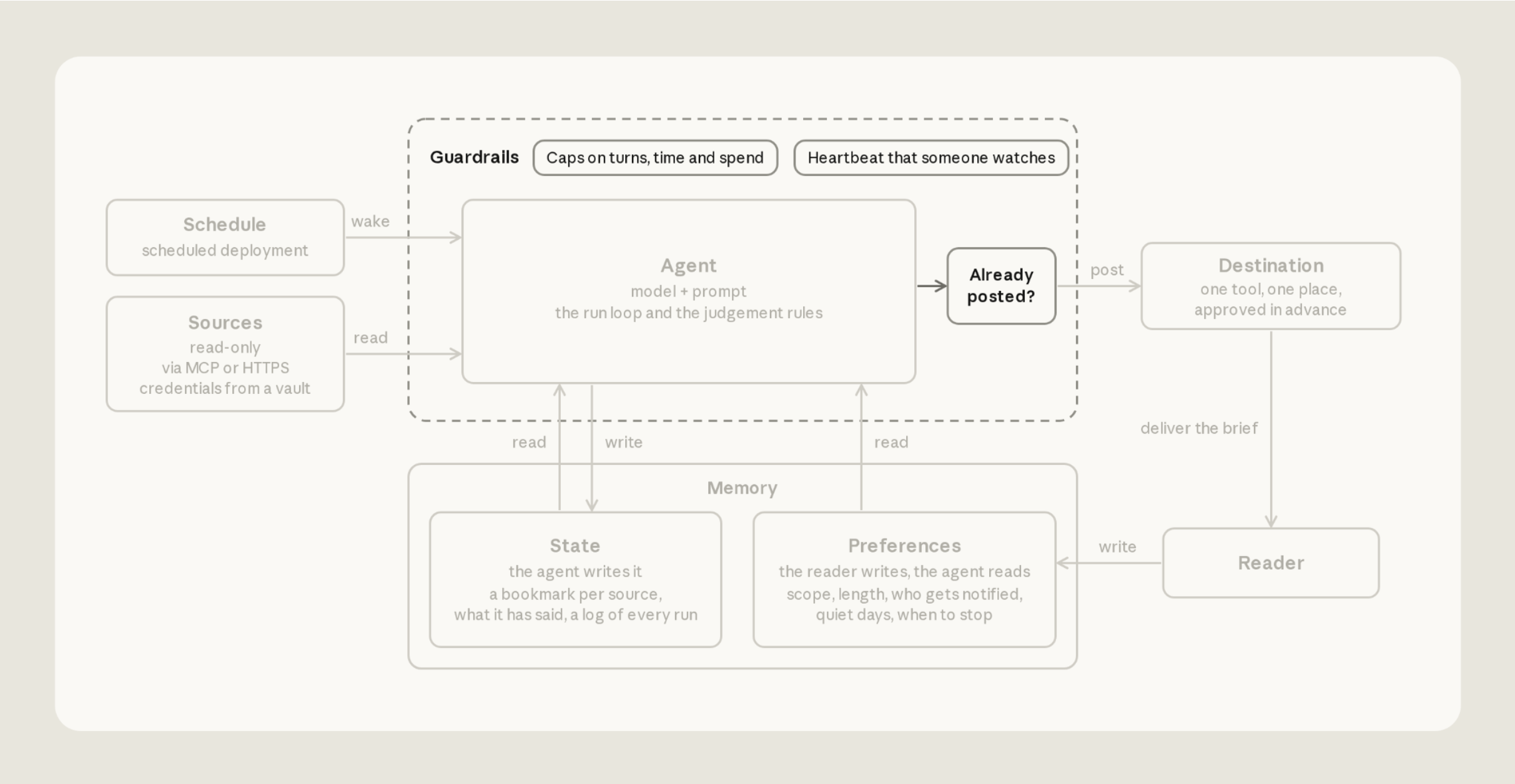
限制它能做什么
Agent 读别人写的消息与 issue,那些文本可能被当成指令。限制它若听话时能做什么。本例中 GitHub token 与 preferences store 只读,environment 只能到 allowlist 上的 host。植入的指令仍可能改变 brief 内容,包括经 Agent 跨运行保留的笔记。但它不能写 GitHub,也不能改你的规则。
Slack 是例外:同一 token 也能发帖,因此只在需要读或发的地方邀请 bot。
按真实运行设定花费上限
花费上限防止成本失控。先从正常运行成本的三到五倍起,再按真实数字收紧。撞到上限的运行会暂停而不是失败,因此上限过低看起来像 brief「忽然安静了」。上限是 deployment.md 里的 budget。每次运行拿到全额;达到则暂停,stop reason 为 budget_reached:
budget:
  type: limit
  max_list_cost:
    amount: "500" # a string, in cents: "500" is $5.00
    currency: USD
开始动手
参考实现可归纳为六条规则:
- 每个源从 bookmark 读,不要用固定时间窗口。
- 读失败报成不可读,绝不当成安静的一天。
- 发帖前再核每条。
- 仅当 Slack 确认后才算发出,再更新 bookmark 与 ledger。
- 每次运行重读偏好,且来自 Agent 不能改的 store。
- Agent 只读之处给只读访问,并限制每次运行能花多少。
Claude Code 可带你走完本文指引。先更新:
claude update然后用 claude-api Skill:
/claude-api managed-agents-onboard https://claude.dev/blog/building-effective-agent-automations/claude-api Skill 会读本文、提议配置、把文件写到项目的 agents/ 文件夹,并用 ant apply 创建资源。把这当作起点,再按你的源、目的地或记忆偏好定制 Agent。