Mod 是跑在 Claude Code 会话里的小 JavaScript 或 TypeScript 文件。它可以观察发生的事、改变 Claude Code 做什么,或画自己的 UI——在终端或桌面应用里。试用不必先学 API。跑 claude,然后描述你要的 mod。它问是否允许热重载时允许,本轮结束时 mod 就会出现。
Claude Code 已让你改很多行为:设置、权限规则、slash 命令、Skills 与状态行。Mods 更进一步:可改写或替换 Claude Code 做的事,并画定制 UI。底层上,mods 是随 plugins 发布的 hooks,每个都能看到会话里发生的每个事件。
这让 mods 成为按你的工作方式定制 Claude Code 的手段。可加你常看的读数、在让你紧张的命令前加护栏,或为你喜欢的读改方式做审查视图。
本指南从空文件夹做一个 mod:Token Weather,在提示词上方画上下文窗口的实时「预报」。大约 80 行。然后走读两个更大的 mods——Blast Radius 与 Replay Theater——展示 API 还能做什么。三者的成品代码在 anthropics/claude-code-playground。
视频(终端):Token Weather、Blast Radius 与 Replay Theater,一个接一个,在终端会话里 — 深色终端里三段演示的标题卡:Token Weather 条带从 Clear 18% 升到 Storm 81%;Blast Radius 拦住 rm -rf build 并列出会删的 9 个文件;Replay Theater 逐步演示把 greet 重命名为 welcome。
视频(桌面):Token Weather、Blast Radius 与 Replay Theater,一个接一个,在桌面版 Claude Code 里 — Claude 桌面应用浅色 Code 标签里同样三段演示:Token Weather 从 Clear 10% 到 Storm 77%;Blast Radius 卡片列出 rm -rf build 会删的 9 个文件;Replay Theater 逐步重命名 greet → welcome。
视频:上下文窗口填满时 Token Weather 条带:Clear 18%、Showers 67%、Storm 81% — 一行终端条带循环三种预报:Clear 的黄太阳、Showers 的蓝伞、Storm 的粉闪电,各带 200k 中的 token 数与近期轮次的小柱图。
Claude Code 2.1.287 或更新。 Mods 默认开启,无需另开。API 可能随版本变。每次 Claude Code 加载 mod,会把你这版构建的类型声明写进 mod 的 .claude-plugin/types/ 文件夹,那些是你版本的权威。
Mod 如何工作
Mod 是行为落在 JavaScript 或 TypeScript 模块里的 Claude Code plugin:
- 文件夹是普通 plugin,带
.claude-plugin/plugin.json清单。 hooks/hooks.json在modules下点名一个模块。- 模块导出
register(on, options)。内部用on(event, matcher?, hook)加 hook。
每个 hook 形状相同:
on("tool.call", { tool: "Bash" }, async ($, e, next) => {
  // $    the mods API: ui, session, state, store, fs, process, clock, http, tool, command, model, ...
  // e    this event's input, as plain data
  // next passes e to the other plugins and then to Claude Code's own behavior
  return next(e);
});
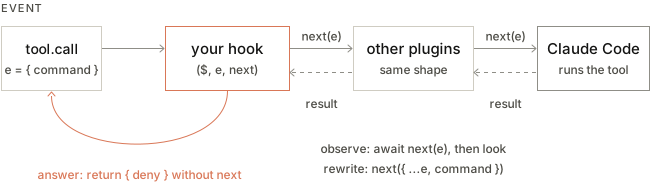
Hooks 形成链,像中间件。你的跑完,next(e) 把事件交给下一个 plugin,最底下 Claude Code 做它本来会做的事。Hook 可做三件事之一:
图:事件经你的 hook,再到其他 plugins,再到 Claude Code。各自调用 next(e) 往下传,结果回流。回答的 hook 不调用 next 就返回。
| 动作 | 做法 | 示例 |
|---|---|---|
| Observe(观察) | const r = await next(e); /* look */ return r |
记录每次文件编辑。每轮后取一次读数。 |
| Rewrite(改写) | return next({ ...e, command: safer }) |
改链其余部分看到的内容。 |
| Answer(回答) | 不调 next,return { deny: "…" } |
拒绝工具调用。自己提供命令或工具。 |
事件覆盖工具调用、已提交的提示词、轮次开始与结束、会话开始与结束、slash 命令,以及 ui.render:界面被画出的每一块。模块跑在自己的 sandbox 里,无 DOM、无 Node,因此外部一切经 $。
与 settings hooks 的差别。 Settings hook 对每个事件跑 shell 命令,经 stdin/stdout 传 JSON。Mod 加载一次并留在会话里。它可保持状态、随事件更新 UI,并回调进 Claude Code:开窗格、跑进程、注册 slash 命令,或注册模型可调的工具。
Claude Code 自己也在用。 Claude Code 的一些功能本身就是 mods 建的,包括 AGENTS.md 支持,以及对话旁的 /diff 窗格。源码带测试,在公开 anthropics/claude-code 仓库的 mods/ 下,可看团队怎么做。
做第一个 mod:Token Weather
Token Weather 在每轮后读上下文窗口有多满,并在提示词上方画一行:天气图标、百分比、窗口已用 token、近期轮次小图,以及上一轮加了多少。
| 已用 | 预报 |
|---|---|
| 低于 25% | ☀ Clear |
| 25–49% | ☁ Cloudy |
| 50–74% | ☂ Showers |
| 75–89% | ☇ Storm |
| 90% 及以上 | ↯ Compact soon |
真实会话里是这样。每轮读更多文件,条带从 ☀ Clear 到 ☂ Showers 到 ☇ Storm:
视频(终端):完整终端会话里三轮 Token Weather:200k 窗口的 18%、然后 67%、然后 81% — 深色终端窗口,每轮让 Claude 读更多 Python 文件,提示词上方条带从黄 Clear 到蓝 Showers 到粉 Storm。
视频(桌面):桌面 Claude Code 里三轮 Token Weather:200k 窗口的 10%、然后 54%、然后 77% — Claude 桌面应用浅色 Code 标签,每轮让 Claude 读更多 weather-station 服务、日志与读数、再测,提示词框上方条带从黄 Clear 到蓝 Showers 到粉 Storm。
捷径:让 Claude 来建
可跳过六步。Claude Code 知道怎么写 mods,因此可描述你要的、让它做。用 claude 开会话并粘贴下面提示词:
Make me a Claude Code mod called token-weather: a live forecast of my context window, shown in the band above the prompt.

What it should show, on one line:
- A weather icon and word for how full the context window is: under 25% ☀ Clear (yellow), 25–49% ☁ Cloudy (cyan), 50–74% ☂ Showers (blue), 75–89% ☇ Storm (magenta), 90% and up ↯ Compact soon (red).
- The percentage used, then the tokens used out of the window, like "134.4k / 200k".
- A small chart of the last 12 turns, drawn with ▁▂▃▄▅▆▇█.
- How much the last turn added, like "▲ +98.3k last turn".

It should update after every turn.
Claude 会问一次是否为本会话打开热重载。允许后,Claude 的轮次结束时条带出现在提示词上方。此后每次改动就地重载,你可继续要微调(「让 Storm 从 70% 开始」「末尾加美元成本」)并看条带变。Mod 只在本会话加载,文件夹稍后清理;要保留就拷出文件夹并像任何 plugin 一样安装(步骤 6)。
注意提示词只描述你想看到什么。写一个不必先懂 API。Claude Code 内置的写 mods 指南覆盖怎么做:状态放哪才能撑过重载、如何用 claude plugin validate 检查 plugin、钩哪些事件。改「What it should show」几行就是你的 mod,不是我们的。
若想先看怎么拼起来,或想核对 Claude 写的,继续读。
步骤 1:创建文件夹
确认 Claude Code 够新:
claude --version # 2.1.287 or later创建此布局:
token-weather/
├── .claude-plugin/
│   ├── plugin.json
│   └── types/            (written by Claude Code when it loads the mod)
├── hooks/
│   ├── hooks.json
│   └── token-weather.mjs
├── types/
│   └── index.d.ts        (added in step 3)
└── tests/
    └── token-weather.test.ts   (added in step 5)
.claude-plugin/plugin.json 是标准 plugin 清单:
{
  "name": "token-weather",
  "version": "0.1.0",
  "description": "A live forecast of the context window, drawn above the prompt.",
  "author": { "name": "You" }
}
hooks/hooks.json 指向模块。一个 mod 正好一个:
{
  "modules": ["./token-weather.mjs"]
}
步骤 2:画点东西
提示词正上方的条带是叫 AbovePrompt 的组件。Claude Code 自己那里什么也不画,因此是好的第一目标。钩它的 ui.render 事件并返回元素树:
// hooks/token-weather.mjs
export function register(on) {
  on("ui.render", { component: "AbovePrompt" }, ($, e, next) => {
    const { Box, Text } = $.ui.resolve(e);
    return Box({
      paddingX: 1,
      children: [Text({ color: "yellow", bold: true, children: "☀  Clear skies" })],
    });
  });
}元素不是全局的。$.ui.resolve(e) 返回正在画的表面上的构造器,因为 Claude Code 画的每个表面支持略不同的集合。JSX 也行,用 h 作工厂。
带着 plugin 开会话:
claude --plugin-dir ./token-weather「☀ Clear skies」出现在提示词上方。保持会话开着。文件夹被监视,每次保存就地重载模块,无需重启。这种快反馈循环是写 mods 好玩的大半原因。
提示: 一旦知道形状,像 捷径 那样向 Claude 描述下一个 mod。它把 plugin 写到同会话热重载的文件夹。
步骤 3:读真实数字并放进 $.state
$.session.usage() 返回与状态行相同的数字。context.tokens 是上次响应所答的输入,context.window 是模型窗口,context.percent 是二者之比。调用免费:仅在你要 breakdown 时才发 token 计数请求。
会话开始与每轮结束后取读数:
on("session.start", async ($, e, next) => {
  const result = await next(e);
  await takeReading($);
  return result;
});

on("turn.complete", async ($, e, next) => {
  const result = await next(e);
  if (!e.agentId) {
    await takeReading($); // main-loop turns only, not subagents
  }
  return result;
});
两个 hooks 都先调 next(e) 再观察。都不改发生的事。
读数放哪。 模块级 let readings = [] 看起来像显然选择,但热重载是全新加载:register 再跑,session.start 再触发,模块变量重来。把历史放进 $.state。它在宿主里为整会话持有具名值,并撑过重载。
// Held by the host, so the history survives a hot reload of this file.
const readings = { plugin: "token-weather", key: "readings" };

async function takeReading($) {
  const { context } = await $.session.usage();
  if (!context?.window) return;
  const tokens = context.tokens ?? 0;
  const percent = context.percent ?? Math.round((tokens / context.window) * 100);
  const { value: history = [] } = await $.state.get(readings);
  await $.state.set(readings, [...history, { tokens, window: context.window, percent }].slice(-HISTORY));
}
状态值在 plugin 的 类型契约 里声明——清单指向的小 .d.ts 文件。加 types/index.d.ts:
export type TokenWeatherReading = { tokens: number; window: number; percent: number };

declare module "claude-code" {
  interface PluginState {
    "token-weather": { readings: TokenWeatherReading[] };
  }
}
再在 plugin.json 加 "types": "./types/index.d.ts"。跳过这步时,claude plugin validate 会报错并点名修复:token-weather.readings is not declared: the manifest's types contract must name it in interface PluginState { … }。
作为回报,重绘免费。渲染 hook 跑时做的 $.state.get 会订阅那次绘制,因此之后每次 $.state.set 重绘条带。你从不调 $.ui.invalidate。
步骤 4:画预报
这里是整模块:
// Token Weather: a live forecast of the context window, above the prompt.

const HISTORY = 12;
const BARS = "▁▂▃▄▅▆▇█";
const FORECAST = [
  { upTo: 25, icon: "☀", word: "Clear", color: "yellow" },
  { upTo: 50, icon: "☁", word: "Cloudy", color: "cyan" },
  { upTo: 75, icon: "☂", word: "Showers", color: "blue" },
  { upTo: 90, icon: "☇", word: "Storm", color: "magenta" },
  { upTo: Infinity, icon: "↯", word: "Compact soon", color: "red" },
];

// Held by the host, so the history survives a hot reload of this file.
const readings = { plugin: "token-weather", key: "readings" };

export function register(on) {
  on("session.start", async ($, e, next) => {
    const result = await next(e);
    await takeReading($);
    return result;
  });

  on("turn.complete", async ($, e, next) => {
    const result = await next(e);
    if (!e.agentId) {
      await takeReading($); // main-loop turns only, not subagents
    }
    return result;
  });

  on("ui.render", { component: "AbovePrompt" }, async ($, e, next) => {
    const { value: history = [] } = await $.state.get(readings);
    if (e.props.hasSurvey || history.length === 0) {
      return next(e);
    }
    const { Box, Text } = $.ui.resolve(e);
    return band(Box, Text, history, e.props.bodyColumns);
  });
}

async function takeReading($) {
  const { context } = await $.session.usage();
  if (!context?.window) return;
  const tokens = context.tokens ?? 0;
  const percent = context.percent ?? Math.round((tokens / context.window) * 100);
  const { value: history = [] } = await $.state.get(readings);
  await $.state.set(readings, [...history, { tokens, window: context.window, percent }].slice(-HISTORY));
}

function band(Box, Text, history, columns) {
  const now = history[history.length - 1];
  const f = FORECAST.find((b) => now.percent < b.upTo);
  const parts = [
    Text({ color: f.color, bold: true, children: `${f.icon}  ${f.word}` }),
    Text({ children: `  ${now.percent}% of context` }),
    Text({ dimColor: true, children: `  ${short(now.tokens)} / ${short(now.window)}` }),
  ];
  if (columns >= 60) {
    parts.push(Text({ dimColor: true, children: "   last turns " }));
    parts.push(Text({ color: f.color, children: sparkline(history) }));
    if (history.length > 1) {
      parts.push(Text({ dimColor: true, children: trend(history) }));
    }
  }
  return Box({ flexDirection: "row", paddingX: 1, children: parts });
}

function sparkline(history) {
  const top = Math.max(...history.map((r) => r.tokens), 1);
  return history.map((r) => BARS[Math.floor((r.tokens / top) * (BARS.length - 1))]).join("");
}

function trend(history) {
  const delta = history[history.length - 1].tokens - history[history.length - 2].tokens;
  if (delta === 0) return "  steady";
  return delta > 0 ? `  ▲ +${short(delta)} last turn` : `  ▼ ${short(-delta)} last turn`;
}

function short(n) {
  if (n >= 1_000_000) return `${+(n / 1_000_000).toFixed(1)}M`;
  if (n >= 1_000) return `${+(n / 1_000).toFixed(1)}k`;
  return String(n);
}
三处细节值得拷进你自己的 mods:
- 组件的 props 在
e.props上。hasSurvey告诉你调查想要条带,因此 hook 用next(e)让给它。bodyColumns是条带真实宽度,旁侧停着窗格时比终端窄。按它给树定尺寸。只有e.component、e.surface、e.requestId与e.viewport在e顶层。 - 没东西可画时让过。 返回
next(e)把条带交回 Claude Code 与其他 mods。 - 用单宽符号,不要 emoji。 ☀ ☁ ☂ ☇ ↯ 在每种终端字体里都能对齐。
保存文件,正在跑的会话会接上。读过大文件的几轮后,条带从 Clear 到 Showers 到 Storm,如本节开头录屏。
步骤 5:校验与测试
claude plugin validate 按 Claude Code 同样方式读清单与模块源码,并报告模块钩了什么、调了什么:
$ claude plugin validate ./token-weather
  > types ./types/index.d.ts declares state: token-weather.readings
  > ./token-weather.mjs hooks: session.start, turn.complete, ui.render{component=AbovePrompt}
  > ./token-weather.mjs calls: $.session.usage (via takeReading), $.state.get, $.state.set (via takeReading), $.ui.resolve
  > ./token-weather.mjs state writes: token-weather.readings
  > ./token-weather.mjs state reads: token-weather.readings
√ Validation passed
claude plugin test 对照真实 Claude Code 运行时跑 plugin 的 *.test.ts。测试用 on 注册的 hooks 在链里跑在 mod 之后,并 stub Claude Code 会回答的内容,因此你精确控制 $.session.usage() 返回什么:
// tests/token-weather.test.ts
import { describe, expect, test } from "claude-code/testing";

describe("token-weather", () => {
  test("the band follows the context window", async ($, on) => {
    // Hooks registered here run after the mod and stub what Claude Code would answer.
    let tokens = 36_100;
    on("session.start", ($, e) => ({ cwd: e.cwd }));
    on("session.usage", () => ({
      value: { startedAt: 0, rateLimits: [], context: { tokens, window: 200_000, percent: Math.round(tokens / 2_000) } },
    }));
    on("turn.complete", () => ({ text: "" }));

    await $.session.start({ surface: "terminal", isInteractive: true, cwd: "/work" } as any);
    const ui = await $.ui.mount({
      plugin: "token-weather",
      surface: "terminal",
      component: "AbovePrompt",
      props: { hasSurvey: false, isWorking: false, maxRows: 10, bodyColumns: 120 },
    } as any);
    expect(await ui.find({ type: "Text", text: /Clear/ })).toBeDefined();

    tokens = 134_400;
    await $.turn.complete({ reason: "answer", answer: "ok", durationMs: 1 } as any);
    expect(await ui.find({ type: "Text", text: /Showers/ })).toBeDefined();
    expect(await ui.find({ type: "Text", text: /67% of context/ })).toBeDefined();
    expect(await ui.find({ type: "Text", text: /▲ \+98\.3k last turn/ })).toBeDefined();
    await ui.unmount();
  });
});
$ claude plugin test ./token-weather
(pass) token-weather > the band follows the context window
1 pass
0 fail测试也检查步骤 3 的重绘行为。turn.complete 后条带更新,mod 从未请求重绘。
步骤 6:分享
Mod 是 plugin,因此发布方式相同。放进 marketplace,可以简单到一个带 .claude-plugin/marketplace.json 的文件夹:
{
  "name": "my-mods",
  "owner": { "name": "You" },
  "plugins": [{ "name": "token-weather", "source": "./token-weather" }]
}
claude plugin marketplace add ./my-mods
claude plugin install token-weather@my-mods --scope user要与成品比较,见 anthropics/claude-code-playground 里的 完整 Token Weather mod。
分享你的 mod
Mod 是 Claude Code plugin,因此与其他 plugin 同样分享,没有新东西要学。把 mod 放进带 marketplace 文件的 GitHub 仓库,该仓库就是你的 marketplace。任何人可从中安装,你可用普通 push 更新。
在 Claude Code 里安装三条命令:
/plugin marketplace add your-org/my-mods
/plugin install token-weather@my-mods
/reload-plugins
重载后 mod 启动。若没出现,重启 Claude Code。
Mod 是跑在你机器上 Claude Code 里的代码,访问权与 Claude Code 相同,由发布者编写而非 Anthropic。因此像装包一样装 mods:先读仓库,只从信任的人安装。你跑命令前什么也不会装。
Claude directory 接受含 mods 的 plugins,可在 claude.ai/directory/manage 提交,让别人不靠你的链接也能找到。
另外两个 mods
Token Weather 只观察与绘制。下面两个 mods 介入事件、开窗格、接收输入。
二者完整代码在 anthropics/claude-code-playground:Blast Radius 与 Replay Theater,各有说明如何建成的 README。
Blast Radius:在风险命令跑之前看它会改什么
当 Claude 用 Bash 调 rm -rf、git reset --hard、git clean、force push 或数据库迁移时,Blast Radius 拦住调用。它算出命令会碰什么,并开带 Proceed 与 Cancel 的窗格。按 2 Claude 收到带理由的拒绝。按 1 命令按原样跑。
视频(终端):Blast Radius 拦住 rm -rf build,列出将删的 9 个文件(1.1 MB)。Cancel 拒绝;第二次试,Proceed 执行。 — 深色终端里 Claude 被要求删 build 文件夹,黄边 Blast Radius 窗格点名命令、列出 build/ 下会删的文件,并提供编号的 Proceed 与 Cancel。
视频(桌面):桌面上 Blast Radius 拦住 rm -rf build,列出将删的 9 个文件(498 KB)。Cancel 拒绝;第二次试,Proceed 执行。 — Claude 桌面应用浅色 Code 标签,Claude 被要求清旧构建输出,黄边 Blast Radius 卡片点名命令、列出文件,并提供编号选择。
它用三个 hooks:Bash 上的 tool.call,以及 Pane 与 AbovePrompt 上的 ui.render。核心是上表的「回答」动作:
on("tool.call", { tool: "Bash" }, async ($, e, next) => {
  const risk = classify(String(e.command ?? ""));
  if (risk === null) return next(e);                 // everything else runs as normal

  const report = await measure($, risk, await $.session.cwd());  // git status, git clean -n, du, ...
  held = { command: e.command, risk, report, decision: null };
  const opened = await $.ui.open({ id: "blast-radius", title: "Blast Radius", focus: true });
  if (!opened.isPlaced) held.where = "band";         // too narrow for a pane: draw above the prompt

  while (held.decision === null && !next.signal.aborted) {
    await $.process.run(["sleep", "0.25"]);          // time inside $ calls doesn't count against the hook's time limit
  }
  if (held.decision === "proceed") return next(e);   // let it run
  return { deny: `Blast Radius held this command: the user pressed Cancel. It would have: ${report.summary}.` };
});
它教什么:
- 用
$.process.run做 dry run。 报告来自工具自己的命令:git status --porcelain、git clean -n、git log HEAD..origin/main、showmigrations。参数以 argv 数组传入,因此路径里没有任何东西当 shell 代码跑。 - 拦住调用。 Hook 每次分发有 10 秒自己的时间,但在
$调用内等待的时间不计。循环在短sleep进程上等到按钮的onPress设好决定,并在next.signal中止时放弃(你按了 Esc)。 - 带热键的按钮。
Button({ label: "Proceed", hotkey: "1", onPress })可点、Tab+Enter,或按数字。 - 降级到条带。 终端够宽时把窗格停在 transcript 旁。
$.ui.open回答isPlaced: false时,同一报告画在提示词上方:
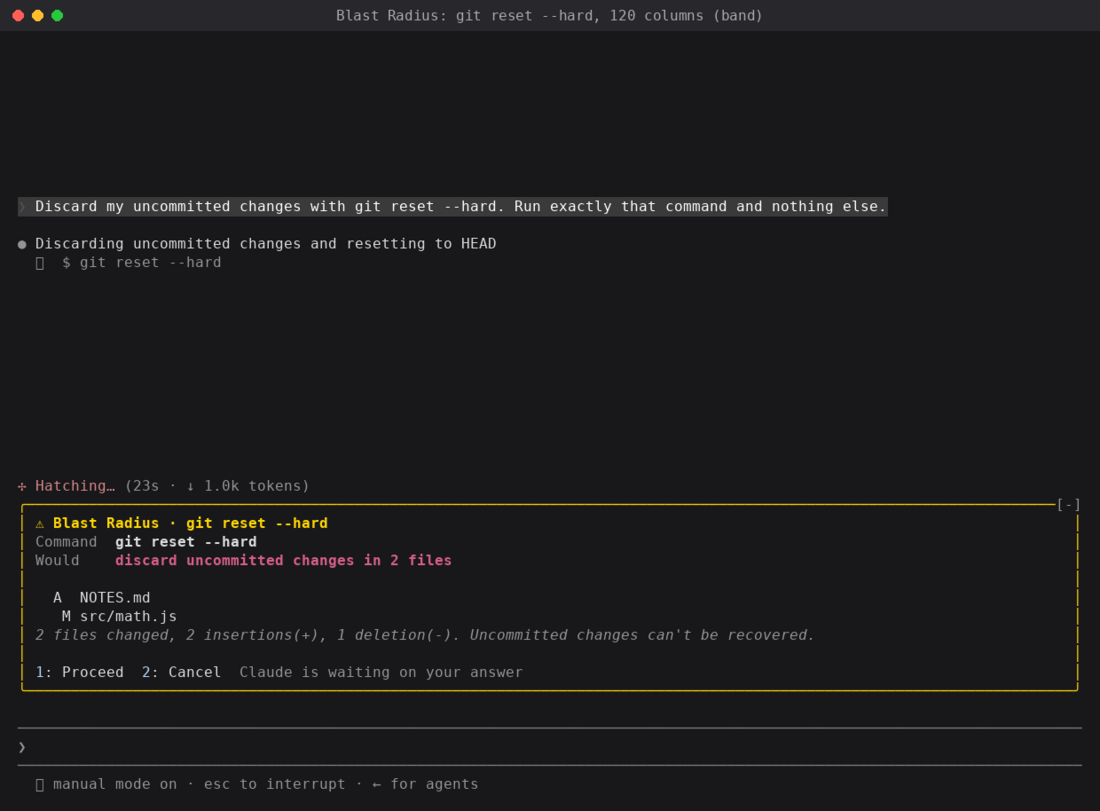
在 120 列时,Blast Radius 把 git reset –hard 的报告画在提示词上方条带
它是安全网,不是权限系统。它读命令文本,因此 $(…)、别名与调用 rm 的脚本能绕过。硬拦用权限规则。
Replay Theater:逐步走完上一轮的编辑
轮次跑时,Replay Theater 记录每次 Edit 与 Write 调用:文件,以及前后文本。轮次结束时,提示词上方出现提示。按 r(或输入 /replay),窗格一次一个 diff 走编辑,带编号步骤条与 Prev、Next、Close 按钮。
视频(终端):Replay Theater:跨 3 文件 5 次编辑重命名后的提示,再在窗格里走步骤 1 到 5 — 深色终端 transcript 显示把 greet 重命名为 welcome 的红绿 diff,提示词上方品红 Replay 提示,再品红边窗格一次一个 diff 走编辑,带 Prev、Next、Close。
视频(桌面):桌面 Replay Theater:跨 4 文件 6 次编辑后的提示,再走步骤 1 到 6 — Claude 桌面应用浅色 Code 标签,Claude 跨四文件把 greet 重命名为 welcome,提示词框上方出现带 Replay 按钮的品红提示,再品红边窗格逐步走编辑。
它从不阻塞或改编辑。它观察:
on("tool.call", async ($, e, next) => {
  if (EDIT_TOOLS.has(e.tool)) state.pending.push(...(await stepsFor($, e)));  // old/new text → diff
  return next(e);                                                              // the edit runs untouched
});

on("turn.start", ($, e, next) => { if (!e.agentId) state.pending = []; return next(e); });

on("turn.complete", async ($, e, next) => {
  const r = await next(e);
  if (!e.agentId && state.pending.length) state.replay = state.pending;       // one replay per turn
  return r;
});

on("session.start", async ($, e, next) => {
  const r = await next(e);
  await $.command.register({ name: "replay", description: "Step through the last turn's file edits" });
  return r;
});
on("command.run", { command: "replay" }, async ($, e) => ({ text: (await openReplay($)) ? "Replaying" : "No edits" }));
它教什么:
- 配对事件。
turn.start与turn.complete把编辑括成每轮一次回放,e.agentId把 subagent 轮次排除在分组外。 - 注册 slash 命令。 在
session.start里$.command.register,再在command.run上回答。 - 读文件。 对 Write,
$.fs.read在写入落地前刚拿到旧内容,因此 diff 是真的。 - 放置是表面的工作。 全屏时窗格停在右侧。80 列时在提示词上方内联打开。无论哪种,mod 画同一棵树。
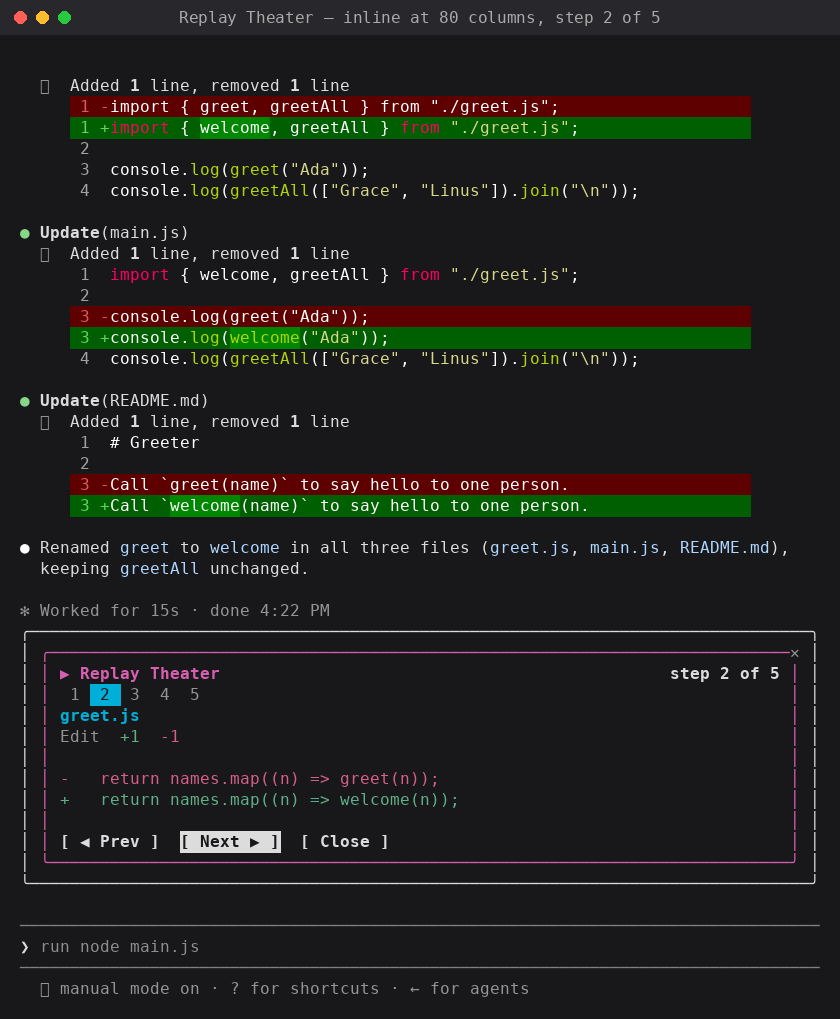
80 列时的 Replay Theater,内联画在提示词上方
值得保持的四个习惯
- 依赖 Claude Code 为你写的类型。 每次加载你的 mod,Claude Code 把这版构建的声明写进 mod 的
.claude-plugin/types/,因此编辑器与tsc -p无需额外步骤。它们是每个事件、$上每个方法、每个元素 props 的参考。 - 从
e.props读 props。hasSurvey、bodyColumns等在那里,不在e本身。 - 为热重载做计划。 每次保存再跑
register与session.start,因此数据放$.state,不放模块变量。 - 画面没出现时读日志。 跑
claude --debug,找 hook 返回了未通过校验的树的那一行。
你会 mod 什么?
这里三个 mods 各来自一个问题:我的上下文有多满?、这条命令即将删什么?、Claude 刚改了什么? 你的问题会不同,这正是要点。起步想法:
- 来自
$.session.usage()的成本或速率限制表,用$.ui.status作状态行 - 给每个提示词加团队约定的
prompt.submithook - 列出 Claude 本会话读过文件的窗格,作它见过什么的实时地图
- 长轮结束时用
$.ui.toast发 toast 的专注计时器 - 针对你技术栈调好的
tool.call护栏,如生产 kubectl 上下文或terraform apply
分享你做的
做了每天都在用的 mod?在 X 或 LinkedIn 发帖,带它运行的 GIF 或截图,让其他开发者看见可能。把 plugin 放进 marketplace(分享你的 mod)并链接,喜欢的人可用三条命令安装。
附录:原页面上的图
这些图在原页面上,但官网的 Markdown 导出里没有,所以附在文末;它们在原文中的位置和说明请看英文原文。