Anthropic 运营着一些计划,组织可以在 Verification Portal(验证门户)中申请这些计划。为了让终端客户通过您的平台使用 Claude 时其获得的批准能够生效,终端客户需要在门户中将其用户配置文件关联到自己的 Anthropic 组织。由您发起这一流程:为该配置文件创建一个注册链接,并将其提供给终端客户。
“User profile”(用户配置文件)用于告知 Anthropic 每个 API 请求是为您的哪位终端客户发出的。您需要为每位终端客户创建一个用户配置文件,并在为其发出的每个请求中发送该配置文件的 uprof_ ID。必须先有配置文件,才能为其创建链接。要创建配置文件,请参阅用于终端客户归属的用户配置文件。
如果您只需要归属功能,或者您的组织未启用创建注册链接的功能,则可以跳过本页。
创建链接
要为某个配置文件创建注册链接,请调用 POST /v1/user_profiles/{id}/action_urls,并在路径中提供该配置文件的 ID。在请求正文中,将 action.type 设置为 enroll_end_user。
如果您的组织未启用创建注册链接的功能,该调用会返回 404。这与找不到配置文件 ID 时返回的状态相同,因此请先检查 ID。
cURL
curl https://api.anthropic.com/v1/user_profiles/uprof_011CZkZCu8hGbp5mYRQgUmz9/action_urls \
  -H "x-api-key: $ANTHROPIC_API_KEY" \
  -H "anthropic-version: 2023-06-01" \
  -H "content-type: application/json" \
  -d '{"action": {"type": "enroll_end_user"}}'
CLI
ant user-profiles:action-urls create \
  --user-profile-id uprof_011CZkZCu8hGbp5mYRQgUmz9 \
  --action '{type: enroll_end_user}'
Python
client = anthropic.Anthropic()

action_url = client.user_profiles.action_urls.create(
    "uprof_011CZkZCu8hGbp5mYRQgUmz9",
    action={"type": "enroll_end_user"},
)

print(action_url.url)
TypeScript
const client = new Anthropic();

const actionURL = await client.userProfiles.actionURLs.create(
  "uprof_011CZkZCu8hGbp5mYRQgUmz9",
  { action: { type: "enroll_end_user" } }
);

console.log(actionURL.url);
C#
using Anthropic.Models.UserProfiles.ActionUrls;

AnthropicClient client = new();

var actionUrl = await client.UserProfiles.ActionUrls.Create(
    "uprof_011CZkZCu8hGbp5mYRQgUmz9",
    new() { Action = new UserProfileEnrollEndUserAction() }
);

Console.WriteLine(actionUrl.Url);
Go
client := anthropic.NewClient()

actionURL, err := client.UserProfiles.ActionURLs.New(
	context.Background(),
	"uprof_011CZkZCu8hGbp5mYRQgUmz9",
	anthropic.UserProfileActionURLNewParams{
		Action: anthropic.UserProfileActionUnionParam{
			OfEnrollEndUser: &anthropic.UserProfileEnrollEndUserActionParam{},
		},
	},
)
if err != nil {
	log.Fatal(err)
}

fmt.Println(actionURL.URL)
Java
import com.anthropic.models.userprofiles.actionurls.ActionUrlCreateParams;
import com.anthropic.models.userprofiles.actionurls.UserProfileEnrollEndUserAction;

void main() {
    AnthropicClient client = AnthropicOkHttpClient.fromEnv();

    var params = ActionUrlCreateParams.builder()
        .userProfileId("uprof_011CZkZCu8hGbp5mYRQgUmz9")
        .action(UserProfileEnrollEndUserAction.builder().build())
        .build();
    var actionUrl = client.userProfiles().actionUrls().create(params);

    IO.println(actionUrl.url());
}
PHP
$client = new Client();

$actionURL = $client->userProfiles->actionURLs->create(
    'uprof_011CZkZCu8hGbp5mYRQgUmz9',
    action: ['type' => 'enroll_end_user'],
);

echo $actionURL->url, PHP_EOL;
Ruby
client = Anthropic::Client.new

action_url = client.user_profiles.action_urls.create(
  "uprof_011CZkZCu8hGbp5mYRQgUmz9",
  action: { type: :enroll_end_user }
)

puts action_url.url
响应中包含该链接及其失效时间:
{
  "type": "user_profile_action_url",
  "url": "https://portal.anthropic.com/enroll?enrollment_token=...",
  "expires_at": "2026-03-15T11:00:00Z"
}
该链接在 expires_at 中的时间之前有效,大约为创建后一小时。请在终端客户需要时再创建链接,例如当他们点击您产品中的某个按钮时,而不要提前创建并放在他们可能稍后才阅读的电子邮件中。在链接过期之前,他们可以多次打开该链接。如果链接已过期,请创建一个新链接:每次调用都会返回一个新的链接。创建新链接不会使之前的链接失效。
任何持有该链接的人都可以在其过期前使用它,因此请只将其提供给对应的终端客户。请将其发送给终端客户 Anthropic 组织的管理员或所有者,因为只有管理员或所有者才能关联配置文件。不要解析该 URL,也不要自行构建 URL。其格式可能会发生变化。
如果您使用的是 Claude Platform on AWS,请改用 POST /v1/user_profiles/{id}/enrollment_url 创建链接,并发送 anthropic-beta: user-profiles-2026-08-18 标头。该请求不需要请求体,响应包含相同的 url 和 expires_at 字段。在 SDK 和 CLI 中,该调用位于 beta 命名空间中:client.beta.user_profiles.create_enrollment_url() (typescript: client.beta.userProfiles.createEnrollmentURL(); csharp: client.Beta.UserProfiles.CreateEnrollmentUrl(); go: client.Beta.UserProfiles.NewEnrollmentURL(); java: client.beta().userProfiles().createEnrollmentUrl(); php: $client->beta->userProfiles->createEnrollmentURL(); cli: ant beta:user-profiles create-enrollment-url)。
POST /v1/user_profiles/{id}/action_urls 在 Microsoft Foundry 上不可用。
终端客户看到的内容
该链接会打开 Anthropic 位于 portal.anthropic.com 的 Verification Portal。终端客户登录后,门户会向其显示您的 Anthropic 组织名称以及该配置文件的 ID。
-
登录
终端客户使用 Anthropic 账户登录:可以是他们已在 Claude Console 或 claude.ai 中使用的账户,也可以是在此步骤中新创建的账户。门户会保持自己独立的登录会话,与 Claude Console 和 claude.ai 分开。如果他们属于多个组织,则需要选择要关联的组织。
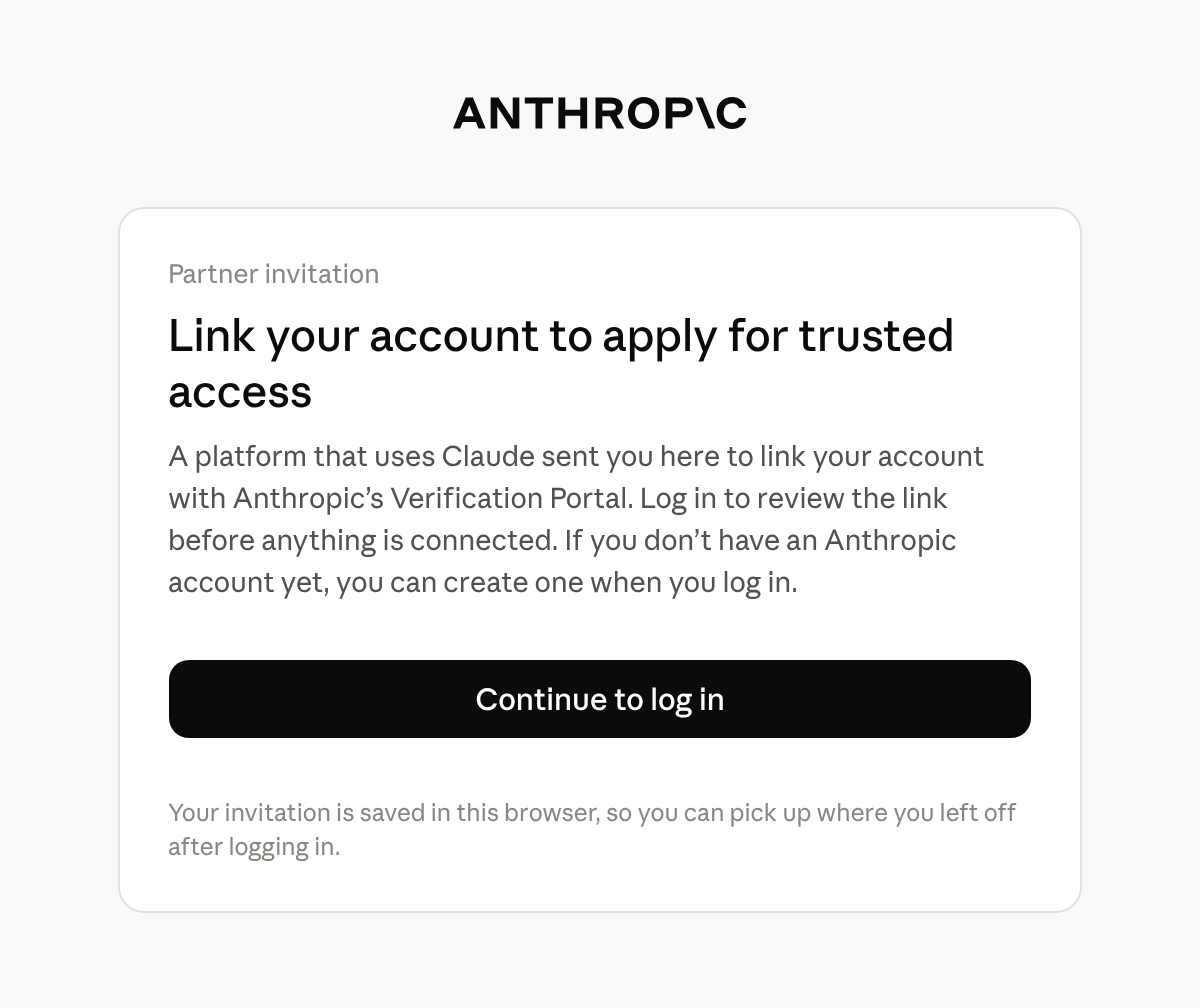
登录之前,终端客户会看到他们被引导到门户的原因。
-
关联配置文件
门户会显示一张标题为 Link your partner profile 的卡片。卡片上列出您的平台、配置文件的 ID、终端客户的组织以及邀请的过期时间。终端客户选择 Link profile 表示接受,或选择 Skip for now 以在不关联的情况下继续进入门户。
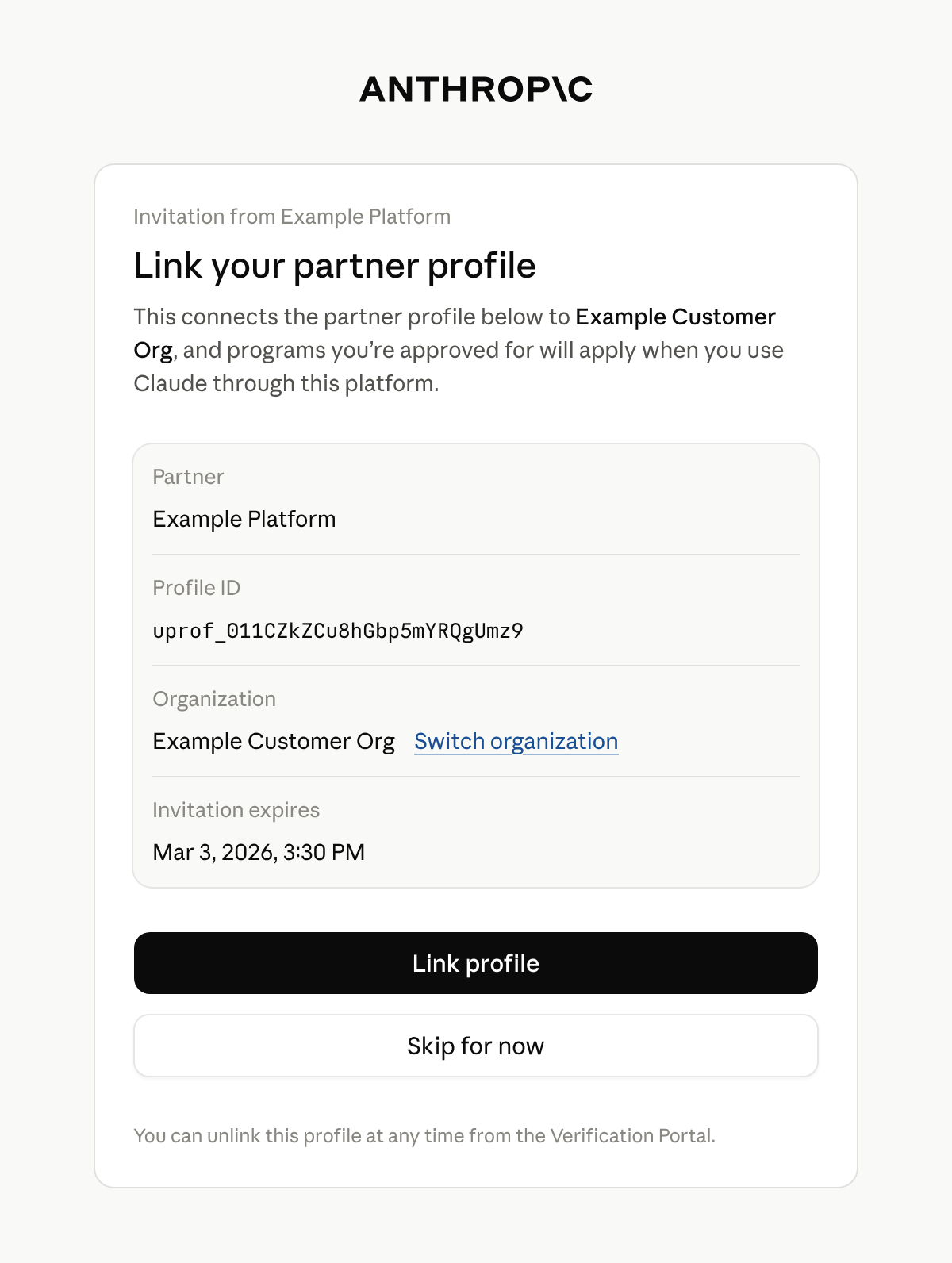
终端客户确认配置文件要关联到哪个组织。
只有组织的管理员或所有者才能关联配置文件。其他人会看到 Admin access needed,并且无法关联该配置文件。他们可以切换到自己担任管理员或所有者的组织。否则,请告知终端客户,必须由其 Anthropic 组织的管理员或所有者打开该链接。
-
查看确认信息
门户会显示 Profile linked 以确认关联成功。终端客户会留在门户中,可以在其中查看其组织可用的计划并进行申请。
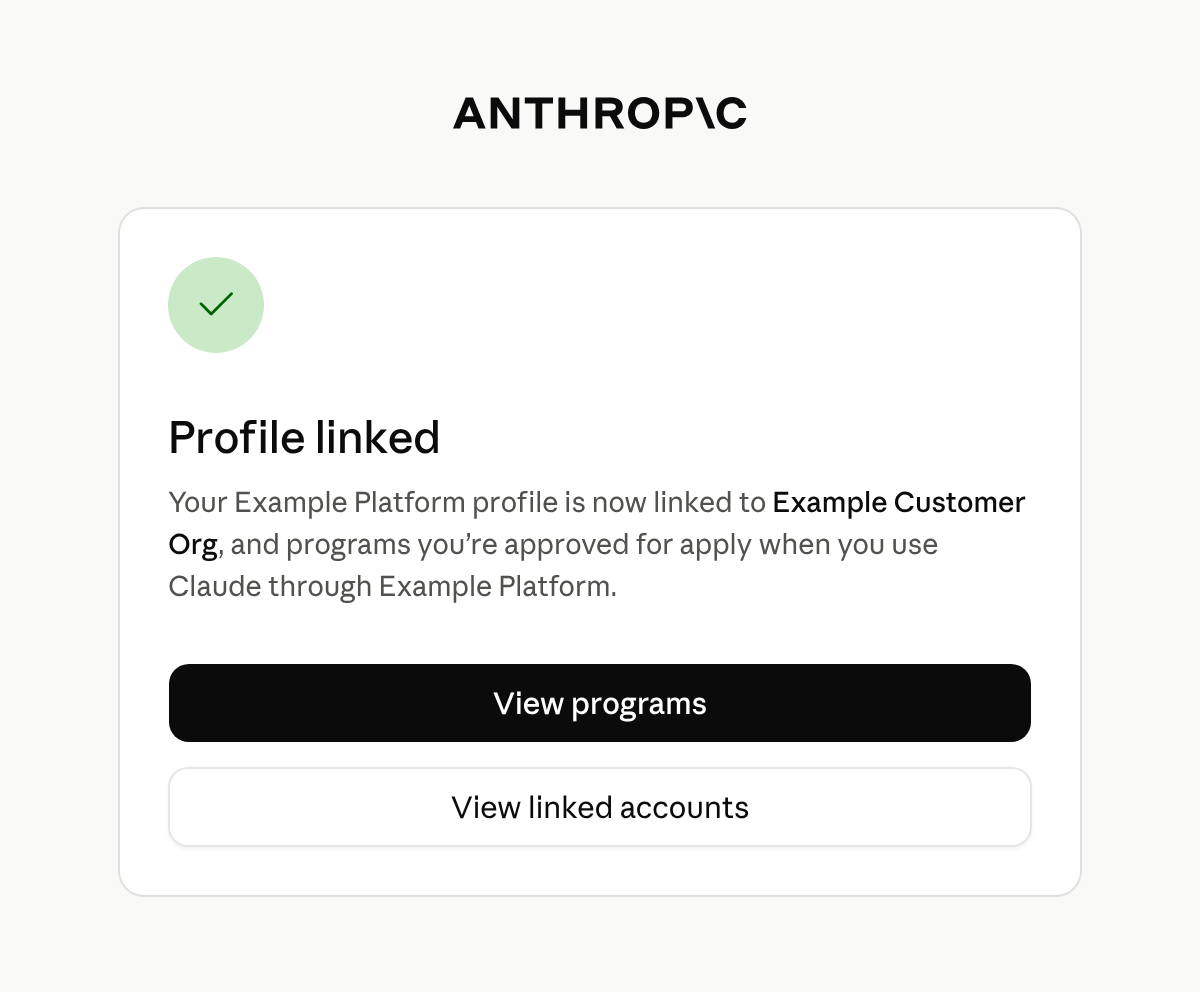
关联完成后,终端客户会留在门户中。
如果管理员或所有者打开链接并登录时链接已过期,门户会显示 This invitation has expired,并告知他们向您索取新链接。
一个配置文件只能关联到一个组织。如果它已关联到其他组织,门户会显示 This partner profile is already linked to a different organization,并且不会进行关联。该配置文件所关联组织的管理员或所有者可以在门户的 Linked accounts 下取消关联。之后,请创建一个新链接并发送给终端客户。
终端客户关联配置文件之后
门户不会将终端客户引导回您的产品,Anthropic 也不会通知您。请在您自己的界面中告知终端客户完成后返回。
关联本身不会批准任何内容。它将配置文件连接到最终客户的组织,使该组织已获批准的计划适用于携带该配置文件 ID 的请求,但 Cyber Verification Program 访问级别除外,这些访问级别由最终客户在门户中为每个已关联的配置文件单独开启。配置文件中没有表明其已关联的字段。
要查看哪些计划适用于某个配置文件,请检索该配置文件并读取 programs。它为每个计划提供一个键,例如 cyber 和 efs,并且每个配置文件都包含所有键。每个键的值为以下之一:
null:Anthropic 没有可报告的该计划状态。如果 Anthropic 尚未为您的组织启用计划,则每个键都为null。- 一个对象:当该计划适用于该配置文件时,其
status为active,否则为pending或rejected。
终端客户可以在门户的 Linked accounts 下看到已关联的配置文件。
如果您的推理运行在 Amazon Bedrock 中的 Claude 或 Claude Models on Google Cloud (Google managed) 上,您也必须关联您自己的账户。只有在您将 AWS 账户或 Google Cloud 项目关联到创建您配置文件的 Anthropic 组织之后,计划才会适用于来自该账户或项目的请求。请参阅在 Amazon Bedrock 和 Claude Models on Google Cloud (Google managed) 上对请求进行归因。
后续步骤
有关检索到的配置文件所包含的每个字段,请参阅检索配置文件参考文档。
要创建配置文件、在请求中发送其 ID 并保持其最新状态,请参阅用于终端客户归属的用户配置文件。